In the mid-range tablet space, two names keep pulling focus: iPad Air vs Samsung Galaxy Tab S9. Both blend premium hardware, polished software, and long runway support that suits streaming, note-taking, and light creative work.
For media lovers and productivity-leaning users alike, the real decision turns on display tech, input options, storage flexibility, and how the ecosystem fits daily workflows. Expect a close race, because strengths land in different places.
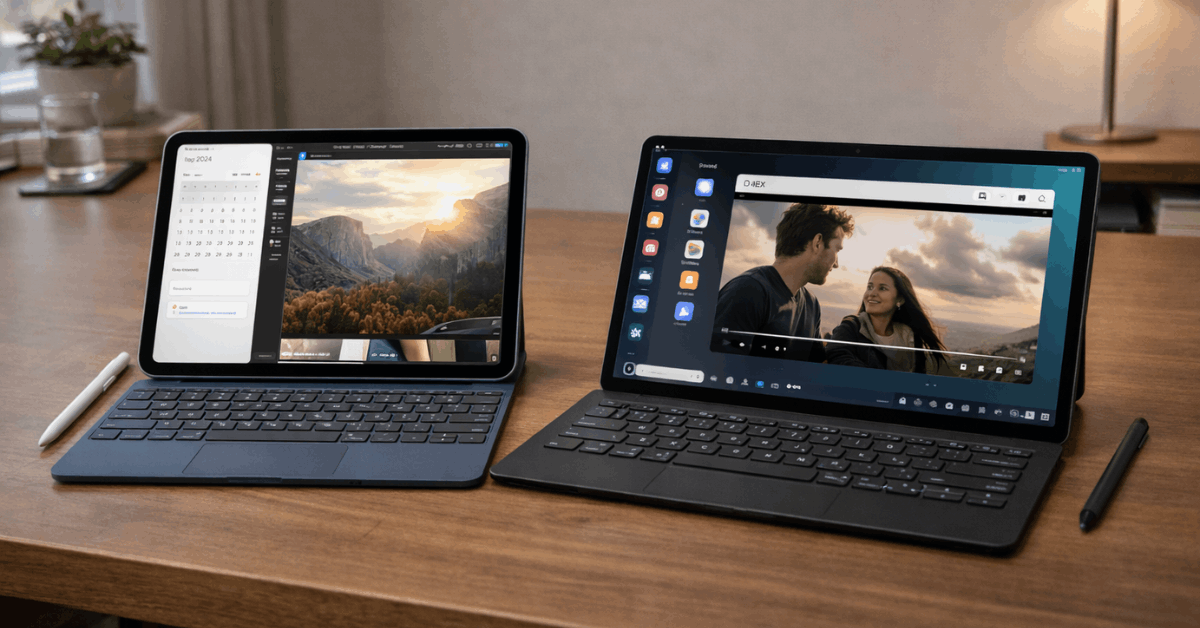
In short, iPad Air M2 leads in raw performance, tablet-optimized apps, and accessory depth. Galaxy Tab S9 delivers a richer 120 Hz AMOLED screen, IP68 durability, and expandable storage that scales with bigger libraries.
Quick Verdict
For most buyers, iPad Air M2 feels faster in heavy tasks, exports, and complex timelines thanks to Apple’s silicon and mature iPadOS app catalog.
Galaxy Tab S9 looks better for movies and games, supports microSD growth, and includes the S Pen in the box for instant handwriting and markup.
Budget for the right accessories on both sides, since keyboards and styluses shape the experience more than spec sheets suggest.
Design and Build Quality Showdown
Choosing between these two models means weighing materials, ergonomics, and durability against the accessories that anchor each workflow.
Both tablets use sturdy aluminum frames and tight tolerances that handle everyday bumps. Differences appear in protection ratings, biometric placement, and how pens attach and charge.
Dimensions and Ergonomics
Galaxy Tab S9 measures about 5.9 mm thin and feels featherlight for long sessions. iPad Air sits near 6.1 mm, which still reads slim in hand, especially on a stand or keyboard base.
Rounded edges and balanced weight distribution make either slate comfortable for extended e-reading and split-view work.
Durability and Biometrics
Tab S9 earns an IP68 rating for dust and water resistance, which helps in fieldwork, kitchens, and unpredictable weather. iPad Air lacks a formal ingress rating but carries tight construction and good drop resilience when paired with a folio case.
Fingerprint authentication lives under the Tab S9 display, while iPad Air places Touch ID in the power button for quick taps.
Pen, Keyboard, and Ports
Samsung bundles S Pen, magnetically docking it for quick access and low-latency writing. Apple Pencil sells separately and pairs seamlessly, with strong tilt, pressure response, and excellent palm rejection.
Both charge over USB-C; Tab S9 supports faster charging rates, while chargers are typically not included in the box.
Display Technology and Audio
For cinematic content, Galaxy Tab S9’s 11-inch Dynamic AMOLED 120 Hz panel brings deep blacks, high contrast, and smooth scrolling that flatter action sequences and games.
iPad Air’s Liquid Retina LCD at 60 Hz counters with accurate color and consistent brightness that suits editing and design tasks in color-critical apps.
Quad-speaker arrays on both devices deliver clear dialogue and convincing spatial cues; Tab S9’s AMOLED pairs especially well with darker scenes, while iPad Air’s tuning emphasizes clarity for calls and long viewing sessions.
Performance, RAM, and Storage
Real-world speed tells the story more clearly than synthetic charts. Apple’s M2 in iPad Air handles layered timelines, RAW photo workflows, and asset-heavy canvases with headroom to spare.
Snapdragon 8 Gen 2 inside Galaxy Tab S9 remains fast and efficient, easily powering multitasking, DeX desktop mode, and gaming at high settings.
Memory and Storage Choices
iPad Air offers fixed internal storage tiers and cannot expand via microSD. Planning ahead matters, since local 4K media and app libraries grow quickly. Galaxy Tab S9 starts at modest internal capacity but accepts microSD cards, making on-device libraries far easier to scale over time.
Thermals and Sustained Loads
Under prolonged exports or multi-hour gaming, iPad Air tends to sustain higher performance thanks to silicon efficiency and aggressive app optimization.
Tab S9 remains stable and responsive during extended use, especially when balanced between video, notes, and browser tabs rather than continuous heavy rendering.
Battery Life and Charging
Tablets rarely match real-world battery claims exactly, since screen brightness, refresh rate, and workloads vary widely. Apple rates the iPad Air for up to ten hours of web or video.
Samsung lists up to ten hours of web and up to fifteen hours of video. Practical testing often shows a roughly 10% drop per intensive hour on iPad Air, while Tab S9 stretches farther in pure video loops and can refuel faster with supported high-wattage chargers.
Chargers typically ship separately; plan on a compatible brick either way.
Software Experience and Ecosystem
iPadOS still carries the strongest library of tablet-first creative, note-taking, and productivity apps, which matters for color work, music tools, pro-grade photo suites, and education.
Stage Manager and external display support now enable extended desktops that feel stable for writing, editing, and reference panes.
Android on Galaxy Tab S9 gains an edge in flexibility, notifications, and file handling, then layers Samsung DeX for a desktop-like layout that runs windowed apps with keyboard and mouse. Cross-device continuity skews toward whichever ecosystem already powers phones, watches, and laptops; lean into that gravity for smoother daily handoffs.
Price and Value
Retail prices fluctuate, but trends hold: iPad Air generally starts lower for the base tier, then climbs with storage and accessories.
Galaxy Tab S9 often lists higher initially, yet offsets the gap with S Pen included and microSD expansion that reduces pressure to buy large internal storage.
Long-term value ties to the apps and services already used, so total cost should include the keyboard, stylus, cloud tools, and any creative suites that drive the workflow.
Media Tablet Buying Checklist For 2025
Strong media devices share the same fundamentals. The points below help narrow choices without chasing minor spec wins.
- Display And Color: Aim for high-resolution panels, accurate color profiles, and HDR support that respects creator intent.
- Refresh Rate And Motion: Smooth 90–120 Hz rendering reduces blur in action scenes and makes scrolling feel snappier.
- Performance Headroom: Prefer current-gen processors for editing, gaming, and long app sessions without stutter.
- Storage Strategy: Decide between larger internal tiers or expandable storage; plan for future libraries.
- Audio And Speakers: Look for well-tuned quad speakers with spatial modes that keep dialogue clear at lower volumes.
- Battery And Charging: Target ten to fourteen hours of mixed use and support for faster charging to limit downtime.
- Input And Accessories: Pencil quality, keyboard travel, and kickstand angles determine comfort far more than raw specs.
- Software Longevity: Favor devices with multi-year OS and security updates plus healthy developer ecosystems.
Specs Snapshot: Core Differences
A concise table highlights the practical deltas that shape daily use.
| Category | iPad Air (M2) | Galaxy Tab S9 |
| Processor | Apple M2 | Snapdragon 8 Gen 2 |
| Display | Liquid Retina LCD, 60 Hz | Dynamic AMOLED, 120 Hz |
| Pen In Box | Apple Pencil sold separately | S Pen included |
| Storage Strategy | Fixed internal tiers, no microSD | Internal tiers plus microSD expansion |
| Durability | No formal ingress rating | IP68 water and dust resistance |
External Displays, Cameras, and Connectivity
For external monitors, both models support wired output over USB-C to suitable displays and hubs. iPad Air adds Stage Manager for extended desktop arrangements that keep separate app layouts per screen, which helps during writing, editing, and research.
Galaxy Tab S9 uses Samsung DeX to present a windowed interface that behaves like a lightweight desktop environment for browser work, documents, and messaging.
Cameras
Cameras serve video calls and scanning rather than pro photography. Front units land at 12 MP on both sides, with iPad Air placing the camera along the landscape edge for natural framing during conferencing.
Rear sensors are 12 MP on iPad Air and 13 MP on Tab S9, yielding slightly higher still resolution on Samsung without compromising overall image quality.
Networking
Networking covers modern Wi-Fi and Bluetooth stacks on both devices, while select Tab S9 variants add 5G for reliable connections away from home or office. Accessory ecosystems remain deep on both platforms; verify keyboard fit, trackpad quality, and case protection before committing to a bundle.
Who Should Choose Which
For creators who live in Final Cut-style timelines, pixel-accurate illustration, and a thick catalog of tablet-first utilities, iPad Air M2 lands as the safer long-horizon pick.
For media fans who value AMOLED contrast, 120 Hz motion, and painless library growth through microSD, Galaxy Tab S9 feels like the smarter entertainment hub.
Student and note-taker workflows skew toward S Pen’s included value; professional publishing stacks often lean toward iPadOS tooling and accessories.
Final Takeaway
In this iPad Air vs Samsung Galaxy Tab S9 comparison, neither tablet clearly outclasses the other; they simply excel in different contexts. iPad Air M2 prioritizes speed, color-reliable apps, and polished external-display workflows.
Galaxy Tab S9 emphasizes a vivid 120 Hz AMOLED canvas, water resistance, and storage flexibility that ages well as files grow. Match the screen you prefer to stare at, the pen you want to write with, and the ecosystem already surrounding your phone and laptop, then commit confidently.