Buying a laptop you plan to keep for five years feels like placing a bet. The MacBook Air 13 vs Dell XPS 13 debate lands differently when durability, not speed, is the priority.
Spec sheets tell you about day one. They tell you almost nothing about year four, when the battery sags and the SSD fills up.
The Air M3 and XPS 13 9340 both look impressive on paper. But their design choices pull them in opposite directions once wear starts adding up.
I think the MacBook Air 13 vs Dell XPS 13 comparison needs a different starting point: not which one runs faster, but which one stays fixable.
What “Reliable Laptop” Means After Year Three
Reliability sounds like a simple concept until you realize it changes over time. A laptop that boots in two seconds on day one can feel sluggish by year three if the storage is nearly full, the battery only holds 60% of its original charge, and the OS no longer receives security patches.
The factors that matter are boring but specific: battery cycle ratings, cooling design, storage replaceability, and how long the manufacturer supports the operating system. Raw performance barely enters the conversation for someone running a browser, a writing app, and a video call at the same time.
Battery Cycle Ratings and What They Mean for Ownership
Apple rates modern MacBook batteries at a 1,000-cycle design target. That number assumes standard depth of discharge and reasonable temperatures. A cycle is one full discharge and recharge, so partial charges count proportionally.
Dell takes a different approach. The XPS 13 9340 ships with a 55 Wh battery and a standard one-year battery warranty.
Extended battery service is available at purchase but costs extra. The gap between Apple’s 1,000-cycle spec and Dell’s one-year default coverage is worth noticing if you plan to keep the machine past warranty.
macOS vs Windows Update Longevity
Apple Silicon gets priority for new macOS versions going forward. The M1 chip, released back in late 2020, still runs the latest macOS builds in 2026. Intel Mac support sunsets after macOS Tahoe, which tells you where Apple’s long-term commitment sits.
Windows 11 on the XPS 13 9340 receives regular security and feature updates, and Microsoft’s servicing timeline is long enough for enterprise planning.
The catch is that Dell has to keep up with driver support. Historically, the XPS family has been reliable on that front, but “historically” is not a guarantee for the next five years.
MacBook Air 13 Build Quality and Cooling
The aluminum unibody on the Air feels rigid for a machine that weighs under three pounds. Hinge behavior stays consistent, and there is minimal deck flex even after extended use. Apple’s haptic touchpad remains the standard for accuracy and click uniformity.
Over years of daily typing, that kind of input consistency reduces wrist strain and avoids the trackpad drift that plagues cheaper designs.
Fanless Design: Quiet, but at a Cost
The Air M3 runs completely fanless. Passive cooling keeps the machine silent during web browsing, document editing, and even light photo work. That silence is a real quality-of-life win.
But push the chip hard for extended periods, and thermal throttling kicks in. The processor slows itself down to keep temperatures safe. The upside: lower peak temperatures mean less cumulative heat stress on internal components.
The downside: sustained heavy workloads like long video exports or code compiles will feel slower than the specs suggest.
I think the MacBook Air’s fanless design gets too much credit as a reliability advantage. The real issue for five-year ownership is not whether the fan motor will fail. Storage failure and battery degradation cause far more laptop retirements than a broken fan ever does.
And on the Air, both the RAM and SSD are soldered to the logic board. A storage failure means a logic board replacement, not a $50 SSD swap.
Soldered Storage: The Durability Blind Spot
This is the detail that changes the whole reliability math. On the MacBook Air M1 and M3, the SSD is part of the unified architecture. There is no M.2 slot. No field upgrade path. No quick data recovery option if the storage controller dies.
Logic board replacement through Apple’s service network is the only path, and the cost is steep. AppleCare+ helps, but it does not eliminate the inconvenience of shipping your machine out and waiting for a centralized repair.
For a student mid-semester or a freelancer on a deadline, that downtime is a real problem.
Also Read: Organized Catalog of Popular Products
Dell XPS 13 9340 Build Quality and Cooling
The XPS 13 9340 keeps Dell’s dense, machined aluminum feel. The edge-to-edge keyboard and hidden haptic touchpad take a day or two to adjust to, since the touchpad boundaries are invisible. Once the muscle memory clicks, the hardware holds up well.
Active Cooling: Fans, Dust, and Higher Clocks
The XPS 13 9340 uses a dual-fan active cooling system. Fans spin up under sustained CPU or GPU load, which keeps clock speeds higher than the Air can maintain during the same tasks. Code compiles and batch photo exports run noticeably faster.
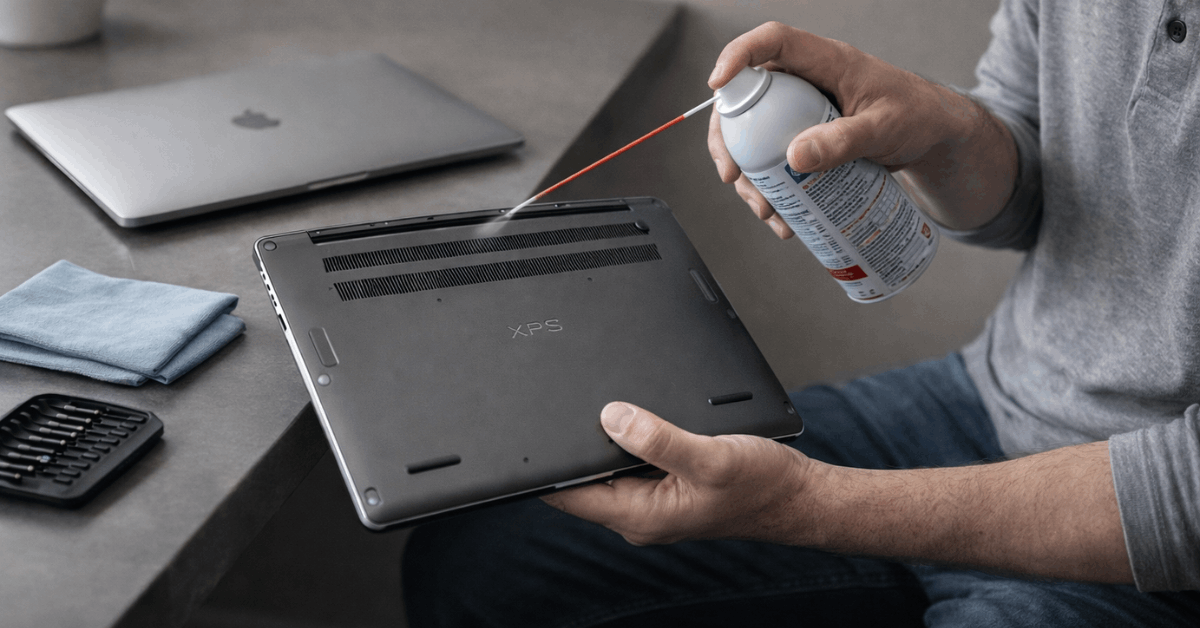
The trade-off is noise and maintenance. Fans pull air, and air carries dust. Over three or four years, dust buildup can reduce cooling efficiency and push internal temperatures higher.
A quarterly blast of compressed air through the vents keeps things running clean, but it is a step the MacBook Air simply does not require.
For workloads that stay light, active cooling is solving a problem that does not exist. For heavier use, those fans earn their keep.
The Replaceable SSD Advantage
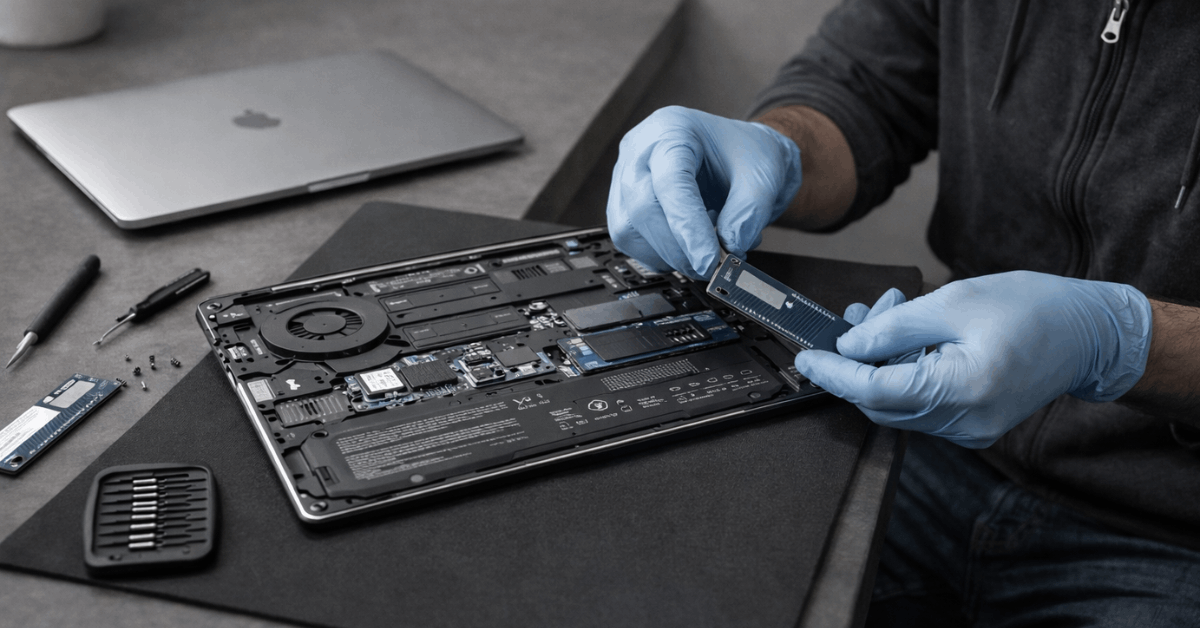
The XPS 13 9340 uses soldered LPDDR5X memory, so RAM is fixed at purchase. But it retains a standard M.2 SSD slot. That single design choice is, in my opinion, the largest long-term reliability differentiator between these two machines.
A storage drive can be swapped in under thirty minutes with a basic screwdriver. Capacity upgrades are cheap. Data recovery after a crash is straightforward because the drive physically separates from the motherboard. Third-party repair shops can handle it without specialized Apple training or parts.
When planning a five-year ownership window, the ability to replace the single component most likely to fail or need upgrading makes a measurable difference in total cost of ownership.
Display, Webcam, and Everyday Wear
Both laptops weigh under three pounds and feel sturdy in a backpack without the torsion stress that loosens hinges over time.
The Air ships a 13.6-inch IPS display with stable color accuracy across brightness levels. Creative users doing photo or design work get reliable calibration without chasing third-party color profiles.
The XPS 13 9340 offers multiple 13.4-inch panel options, including OLED. That OLED panel delivers higher contrast and richer color, but it comes with a caveat: static images left at high brightness for long stretches can cause image retention.
If your workflow involves dashboards or document editing where the same interface elements sit in the same spot for hours, the IPS option may age better.
Apple’s 1080p webcam processing pipeline produces cleaner video than most Windows competitors at this price. Dell counters with an IR camera for fast face unlock. Neither webcam is a wear item, but the video call quality difference is noticeable if you spend hours in Zoom or Teams every week.
Warranty and Service Paths Compared
Knowing how each company handles repairs tells you more about long-term reliability than any spec sheet.
| Factor | MacBook Air 13 (M1/M3) | Dell XPS 13 9340 |
|---|---|---|
| Cooling | Fanless, passive | Dual-fan, active |
| Storage | Soldered SSD, no upgrade | User-replaceable M.2 SSD |
| Battery coverage | 1,000-cycle design, AppleCare+ covers below 80% capacity | 55 Wh, 1-year standard warranty, optional extensions |
| OS support | Apple Silicon prioritized for new macOS | Windows 11 long servicing timeline |
| Repair access | Centralized Apple service, logic board swaps | Broad third-party repair, routine SSD swaps |
The takeaway: Apple’s approach bundles everything into a sealed, integrated package backed by AppleCare+, while Dell’s design lets independent shops handle the most common failure point at a fraction of the cost.
Treat these maintenance habits as non-negotiable for either machine:
- Set conservative charge targets (keep the battery between 20% and 80% on desk duty) to slow chemical degradation
- Clean vents and hinge areas with compressed air every three months, especially on the XPS 13
- Use a quality USB-C hub instead of constantly plugging cables directly into the laptop ports
- Keep at least 20% of the SSD free at all times to preserve write endurance and speed
Dell’s XPS 13 support page lists specific driver updates and service manuals if you want to check part availability before buying.
Questions People Ask About MacBook Air 13 vs Dell XPS 13
Q: Can the MacBook Air M3 handle heavy workloads without a fan? Light to moderate tasks run fine. Extended CPU-heavy work triggers thermal throttling, which slows performance to keep temperatures safe. The Air is not built for sustained heavy computing.
Q: How long does Dell support the XPS 13 with driver updates? Dell has maintained solid driver support for the XPS line over past generations. The 9340 runs Windows 11, which receives regular security patches and feature updates on Microsoft’s long-term servicing schedule.
Q: Is AppleCare+ worth buying for the MacBook Air? If you plan to keep the laptop more than two years, AppleCare+ covers battery service when capacity drops below 80%. Since the Air’s battery is not user-replaceable, that coverage removes the biggest long-term cost risk.
Q: Does the XPS 13 OLED panel burn in over time? Image retention is possible if static elements sit at high brightness for extended periods. Switching to the IPS panel option or using screen savers reduces that risk for users who leave dashboards or editors open all day.
Q: Which laptop is easier to repair outside of warranty? The XPS 13 wins here because of the M.2 SSD slot. Any third-party shop can swap the drive. MacBook Air repairs go through Apple or authorized service providers, and storage issues mean a full logic board replacement.
Conclusion
The MacBook Air 13 rewards owners who want silence, battery endurance, and long macOS support. The Dell XPS 13 9340 rewards owners who value a replaceable SSD and flexible display options.
Five-year reliability depends more on storage serviceability than any other single factor. That one detail should steer the decision more than benchmarks or brand loyalty ever could.